The Versatile Family Monogram: Integrating SVG, DXF, PNG, EPS, and PDF into Your Creative Workflow
For creators and small business owners, the efficiency of a project often hinges on the quality and adaptability of the initial assets. A family monogram design supplied in multiple file formats—specifically SVG, DXF, PNG, EPS, and PDF—is not just a decorative graphic; it is a foundational tool designed for seamless integration into diverse creative and professional processes. Understanding how to deploy each format within your workflow transforms a simple download into a versatile resource, saving significant time and ensuring compatibility across various platforms and physical outputs.
The Core Formats and Their Strategic Roles in a Project
Each file type in a comprehensive family monogram bundle serves a distinct purpose, aligning with different stages of execution. The SVG (Scalable Vector Graphic) is the cornerstone for digital fabrication. Its vector nature means it contains mathematical paths, not pixels, allowing it to be resized infinitely without loss of quality. This is critical when preparing designs for cutting machines like Cricut or Silhouette Cameo, where precise contours for vinyl, cardstock, or fabric are required. Before you load a design into your machine software, confirming you have the SVG ensures clean, sharp cuts regardless of whether the final output is a small door hanger or a large wooden sign.
Complementing the SVG, the DXF (Drawing Exchange Format) file acts as a reliable alternative for certain software ecosystems. Some older or specialized CAD and cutting machine programs may prefer DXF for its simplicity in handling pure vector paths. Having this format on hand is a practical step in preparation, mitigating compatibility issues that can arise during the crucial transfer phase from digital design to machine-ready file. The EPS (Encapsulated PostScript) file, another robust vector format, is often the preferred choice for professional graphic design software like Adobe Illustrator. If your workflow involves further refinement—such as integrating the monogram into a complex t-shirt design layout or a business logo before sending to a print service—the EPS provides a stable, editable foundation.
The PNG with a transparent background serves a fundamentally different function. It is a raster image, meaning it is composed of pixels. Its primary utility comes after the vector work is done, or in contexts where vector support is absent. You might use the PNG directly in digital publishing: placing it on a website, a social media post announcing your family business, or within a simple digital card-making app that doesn't support SVG. The PDF, meanwhile, offers a universal container. It is excellent for proofing, sharing a non-editable visual concept with clients or family members for approval, or for situations where you need a quick, high-quality print from a standard home printer for a prototype. Organizing these files from the start, knowing which to use for which phase, streamlines the entire implementation.
Workflow Integration: From Customization to Final Output
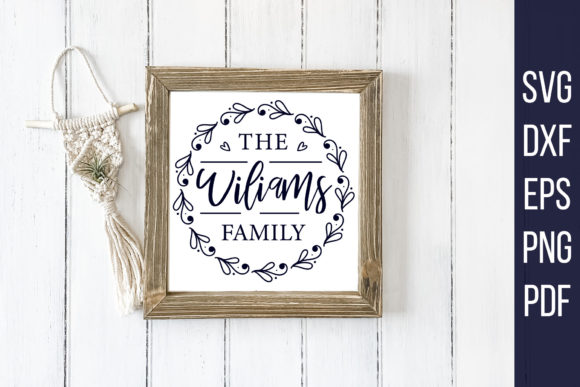
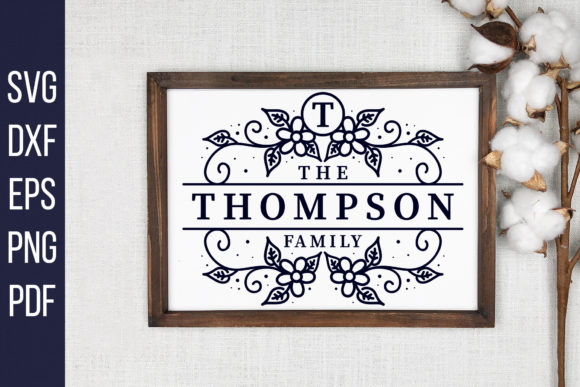
The true value of a customizable family monogram bundle is realized in its placement within a holistic workflow. The process typically begins with the editable vector files (SVG or EPS). Using software like Inkscape, Illustrator, or even the design software native to your cutting machine, you replace the placeholder text with your family name or initials. This customization step is a critical planning decision, affecting the aesthetic balance of the final leaf and floral design. Choosing a font that complements the organic elements requires consideration of the end use—a bold font for a backyard sign, a elegant script for wedding card making.
Once customized, your workflow branches based on the desired outcome. For physical craft output, you proceed with the SVG to your cutting machine software. Here, interaction with other tools and materials is key. You must consider the material settings (pressure, speed) for your machine, which are informed by the complexity of the monogram's vector paths. A design with intricate floral elements might require a finer blade and a slower cut speed on delicate materials like parchment paper for card making. For t-shirt design, the SVG might be used to cut heat-transfer vinyl, but its paths also serve as the basis for a screen printing template, interacting with a completely different set of production resources.
If your project is digital, such as creating branded materials for a family blog or small business, the workflow shifts. The customized SVG or EPS is imported into your web design tool (like Canva) or presentation software. Here, the monogram interacts with other digital assets: photographs, color palettes, and layout grids. The PNG becomes a handy, ready-to-place asset for quick mock-ups. Throughout this process, consistency is maintained because you are working from the same core vector design, ensuring your family monogram looks identical across a vinyl decal, a website header, and a printed PDF brochure.
Practical Considerations for Quality Control and Efficiency
Successful implementation hinges on a few practical observations. First, always verify file compatibility before beginning deep work. Quickly test the SVG in your cutting machine software and the EPS in your design suite to avoid mid-project roadblocks. Second, establish an organizational system for your downloaded files. Label them clearly (e.g., “Family_Monogram_Custom_SVG”) and store them with related project assets. This supports long-term use, allowing you to revisit the design for future projects—perhaps a holiday ornament version from the same floral motif—without searching through cluttered downloads.
Efficiency is also gained by understanding the limitations and strengths of each format. Do not use the PNG for scaling to large-format sign cutting; the raster pixels will blur. Conversely, do not burden a simple digital card app with an SVG file it cannot parse. Using the correct format for the correct task is a fundamental efficiency hack. Furthermore, the note that these are digital downloads for personal use with no physical shipment is a crucial part of the planning stage. It means your workflow begins immediately upon purchase, with no wait time, but it also imposes a responsibility to manage the digital asset ethically within your own projects, respecting the creator's terms.
Extending Use Cases: Beyond the Initial Craft Project
The applications for a multi-format family monogram extend far beyond a single craft. For entrepreneurs and marketers, this asset can become part of a branding toolkit. Imagine using the consistent monogram across all customer touchpoints: the EPS for professional business cards and invoice logos, the PNG for email newsletter headers, and the SVG for cutting branded merchandise like tote bags for a small family-run shop. This creates a cohesive brand identity built from a single, adaptable design resource.
For educators or bloggers creating content about family history or DIY projects, the files serve as practical visual aids. A PNG can be embedded in a blog post about creating monogrammed gifts, while the PDF can be included as a printable template within a tutorial resource pack for subscribers. The design interacts with content calendars, publishing platforms, and educational outcomes. Even for personal goals like organizing a family reunion, the monogram can be deployed across formats: SVG for custom-cut t-shirts for attendees, PNG for digital invitations, and PDF for printed schedules and maps, unifying the event's visual theme efficiently.
Integrating this bundle smoothly into your routine ultimately comes down to viewing it not as a static image, but as a dynamic set of instructions for various outputs. By mapping which format aligns with each tool in your arsenal—your cutting machine, your design software, your printer, your web platform—you turn a simple download into a powerful, process-oriented asset. You move from planning with a generic idea to executing a personalized, high-quality result across mediums, all while maintaining control over the preparation, compatibility, and final quality of your family-centric creations.